Configra is a configuration service you deploy yourself. Your YAML / JSON refers to values stored in Configra’s Vault. When an application requests an environment, Configra replaces those references with that environment’s values and returns the complete configuration.
Moving from development to testing or production changes the requested environment and returned values, not the application’s field names or reference keys. Here is a payment service connecting to a database.
Example: the same configuration, different environment values
1. Store three sets of values in Vault
Create Vault item platform.database: Namespace platform, Item key database. Add Text fields host and username, and Secret field password. Assign values for each environment:
| Environment | host | username | password |
|---|---|---|---|
development |
mysql.dev.example |
payment_dev |
demo-dev-only |
testing |
mysql.test.example |
payment_test |
demo-test-only |
production |
mysql.prod.example |
payment_prod |
demo-prod-only |
These addresses and passwords are demo values, not real database credentials. In the workspace, each set is a Variant bound to the environment shown. The field keys stay the same in all three.
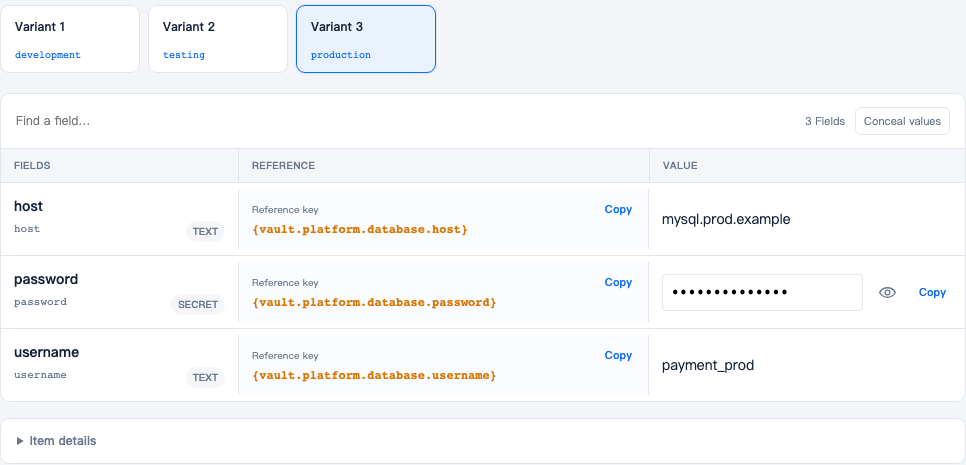
After saving the table’s values, you should see the three fields host, username and password. Production is selected above; choose another Variant to inspect that environment. These are real screenshots of a demonstration environment. Click to open the original.
2. Use one set of references
Save this YAML in Configs with Config key payment:
database:
  host: '{vault.platform.database.host}'
  port: 3306
  username: '{vault.platform.database.username}'
  password: '{vault.platform.database.password}'
Save it for development, then clone the Config to testing and production. All three can use identical text. Configra does not automatically create configuration in an environment you have not set up. Later edits to one environment’s Config text do not automatically change the others.
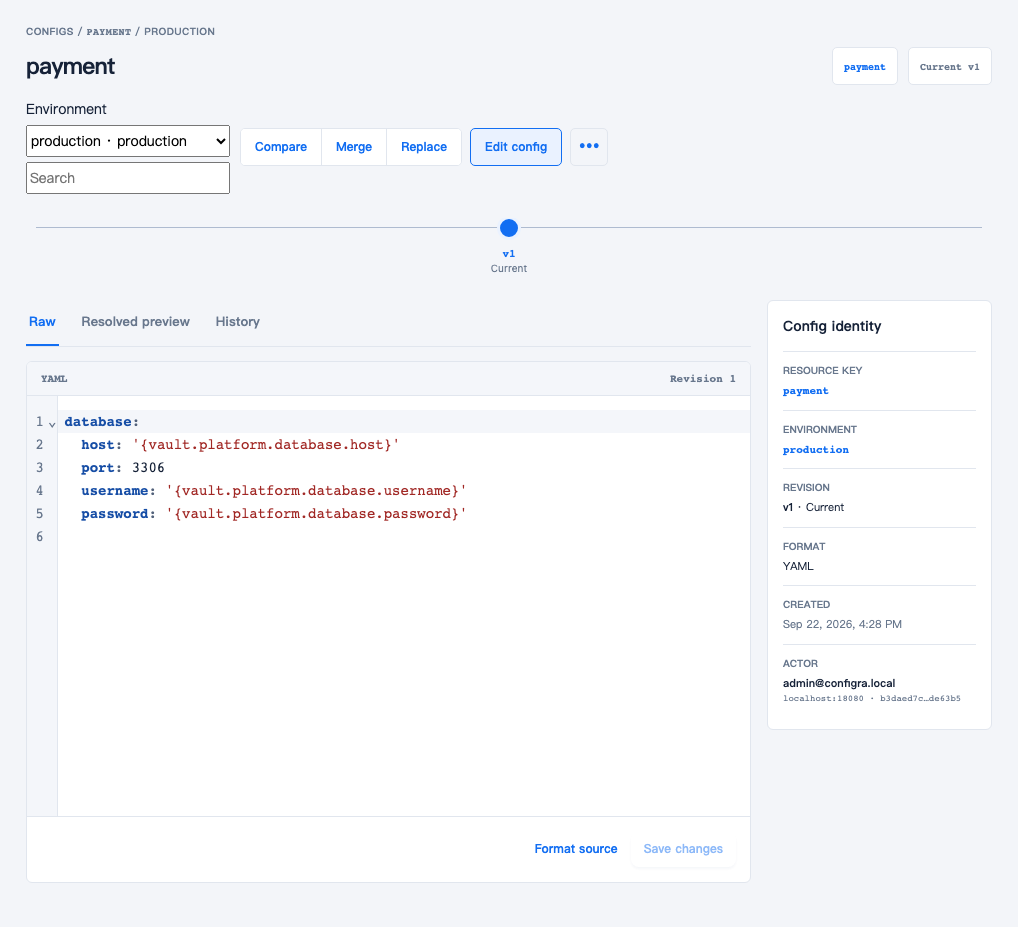
The Config key is payment and the selected environment is production. The raw references match the code above; their keys do not change between environments.
You do not need fields such as password_dev or password_test, or different reference names. port: 3306 is an ordinary value written directly in the Config and is preserved.
3. Request an environment and receive filled-in configuration
Reading payment in development returns this configuration content:
database:
  host: 'mysql.dev.example'
  port: 3306
  username: 'payment_dev'
  password: 'demo-dev-only'
Request testing instead:
database:
  host: 'mysql.test.example'
  port: 3306
  username: 'payment_test'
  password: 'demo-test-only'
Request production instead:
database:
  host: 'mysql.prod.example'
  port: 3306
  username: 'payment_prod'
  password: 'demo-prod-only'
The application always reads database.host, database.username and database.password. It does not rename keys for each environment or resolve {vault...} itself. These examples show only the configuration body, exposed as result.Content in the Go SDK; responses also include revision metadata. Do not log real passwords.
If the application uses JSON
Choose JSON when creating the Config and use the same reference syntax:
{
  "database": {
    "host": "{vault.platform.database.host}",
    "password": "{vault.platform.database.password}",
    "port": 3306,
    "username": "{vault.platform.database.username}"
  }
}
A production read returns this configuration body:
{
  "database": {
    "host": "mysql.prod.example",
    "password": "demo-prod-only",
    "port": 3306,
    "username": "payment_prod"
  }
}
This is an alternative to the YAML above; you do not need to save both. The stored Config determines the returned format: a read does not automatically convert YAML into JSON. A reference must occupy the entire string value; interpolation such as "password={vault...}" is not supported.
Where to select the environment
With an initialized Go Client, this call reads the testing environment:
result, err := client.ReadResolvedConfig(ctx, "testing", "payment", "")Replace testing with development or production. Keep payment and the document’s keys unchanged. Your application can get the environment name from its existing deployment settings and pass it to the SDK. See the Go SDK guide for initialization and error handling.
In Kubernetes read objects, set environment: testing and keep config: payment. Configra does not infer the environment from a cluster name, Namespace or the machine’s ENV variable. The Token must grant the requested environment. Missing environment values produce an error, not a fallback to another environment’s password.
Where to start
To try the product, follow the local quickstart to open the workspace and create a configuration. You do not need a Kubernetes cluster or prior knowledge of certificate issuance for that first step.
If Configra is already running and you want to connect an application, choose its reading method:
| How the application reads | Guide | What must happen after a change |
|---|---|---|
| A Go program requests configuration | Go SDK | The program validates and applies the new configuration |
| A program in Kubernetes reads files | CSI file mounts | Enable file updates and make the program reread them |
| It already uses Secrets / ConfigMaps | Kubernetes synchronization | Reread updated files; recreate Pods to change environment variables |
What you manage
- Environment: separates settings for development, testing or production.
- Config: the YAML or JSON document an application reads.
- Vault: stores values shared by configurations, such as database accounts, passwords and certificate files. This is a Configra feature, not a separate HashiCorp Vault installation.
- Credentials: Tokens and client certificates used to control application access.
Use the glossary when a workspace label is unfamiliar.
What a deployment needs
Configra runs as two processes: management serves the workspace, and api serves application reads. Starting the workspace does not also start the read API.
They share MySQL and a Master Key used for encryption. A deployed service also needs a login provider, NATS messaging, ClickHouse log storage and HTTPS certificates. The deployment guide explains these inputs; the local quickstart prepares demo versions.
Before you use it
The current stable release is v1.0.1. Before rollout, verify ingress, capacity and backup recovery in your own environment.
A Token granted an environment can read all its Configs and Vault values, not just one item. Administrator and read-only roles also cover the whole workspace. If teams or applications must not read each other’s data, names and folders are not enough: use separate deployments or another suitable isolation mechanism.