This guide assumes you can deploy applications with kubectl. It covers application reads, not deploying Configra itself. For a first evaluation, use the local quickstart without Kubernetes.
Choose a reading method
| Mode | Stored in | Updates | Use when |
|---|---|---|---|
| CSI provider | Ephemeral Pod CSI files | Driver rotation; application rereads | You do not want native configuration objects |
| Binding controller | Secret or ConfigMap in Kubernetes API / etcd | Native volume refresh; envFrom needs Pod replacement | The application already uses Kubernetes configuration |
You can maintain configuration in Configra instead of editing ConfigMaps, without replacing Kubernetes’ built-in API:
- CSI files: a driver mounts configuration in the Pod without first creating a native Secret / ConfigMap.
- Native synchronization: a background controller periodically reads Configra and writes a Secret / ConfigMap. Applications keep their existing file or environment-variable setup.
Neither method reloads your application. Environment variables are read at process startup, so changed variables need a newly created Pod.
If your application uses envFrom, start with “Environment variables: a complete example” below. It creates a demonstration Deployment, checks its variables, and walks through an update. Applications that read YAML/JSON files can keep their file format; they do not need to switch to environment variables.
Prepare deployment
Before starting:
- Deploy Configra with an API address reachable from the cluster.
localhostinside a Pod points to that Pod, not your computer. - Obtain the v1.0.1 source code and run the commands below from its root. Binary release bundles include deployment manifests, but not the Dockerfile or source needed to build images.
- Create Configra environment
production. The file examples use Configapplication; the environment-variable example uses Configapplication_env. Their contents appear below. If using the quickstart’sdevelopment/payment, change the environment and Config key in the manifests. - Prepare a Token granting that environment plus a client certificate/key, using the credential guide.
These commands create resources in your current kubectl context. Check that you have not accidentally selected a production cluster:
kubectl config current-contextIf you do not have the source yet, download it first. Otherwise enter the root of your existing checkout of this version:
git clone --depth 1 --branch v1.0.1 https://github.com/viber-ops/configra.git configra-1.0.1
cd configra-1.0.1
Build and push the configra-kubernetes image. Replace registry.example.com/team with a registry you can push to and your cluster can pull from. Private registries also need workload imagePullSecrets.
docker build -f kubernetes/Dockerfile -t registry.example.com/team/configra-kubernetes:1.0.1 .
docker push registry.example.com/team/configra-kubernetes:1.0.1
The image architecture must match your nodes. For example, when building on an Apple Silicon Mac for amd64 nodes, use the commands below instead. buildx --push pushes directly, so do not run a separate docker push. For a mixed-architecture cluster, use linux/amd64,linux/arm64 as the platform list:
kubectl get nodes -L kubernetes.io/arch
docker buildx build --platform linux/amd64 -f kubernetes/Dockerfile \
  -t registry.example.com/team/configra-kubernetes:1.0.1 --push .
An overlay is your deployment customization directory: it replaces example images, API addresses and namespaces without changing the program. Complete overlays appear below. The provider/controller deployment selects the API address; application read rules cannot override it.
Make sure the application namespace exists, creating it first if needed. This example uses configra-app. Replace /secure/ paths with the actual protected files, then create the credentials Secret:
kubectl create namespace configra-app --dry-run=client -o yaml | kubectl apply -f -
kubectl -n configra-app create secret generic configra-credentials \
  --from-file=token=/secure/configra-token \
  --from-file=tls.crt=/secure/client.crt \
  --from-file=tls.key=/secure/client.key
The deployment examples on this page use an internal server CA. Secret configra-server-trust, with key ca.crt, verifies the API server. This is not the CA that issues client certificates in Administration:
kubectl -n configra-app create secret generic configra-server-trust \
  --from-file=ca.crt=/secure/server-ca.crt
Replace /secure/server-ca.crt with the API server certificate’s actual issuing CA. For public Web PKI, remove --server-ca-file, the server-trust volumeMount and its volume to use system trust roots. Do not bypass verification with insecureSkipVerify.
Create these Secrets once. AlreadyExists on a repeated command does not mean integration has failed. Rotate credentials by updating the existing Secret, not by deleting active credentials first. configra-app is a Kubernetes namespace; production is a Configra Environment. They are different fields.
Use separate workload Tokens/certificates for independent rotation and revocation. Tokens granting the same Environment still have the same Configra read scope; Kubernetes namespaces do not narrow that grant.
CSI file mounts
In Configra, select production, create a YAML Config with key application, and save this demonstration content. It is a Configra configuration document, not a Kubernetes manifest:
server:
  port: 8080
  log_level: info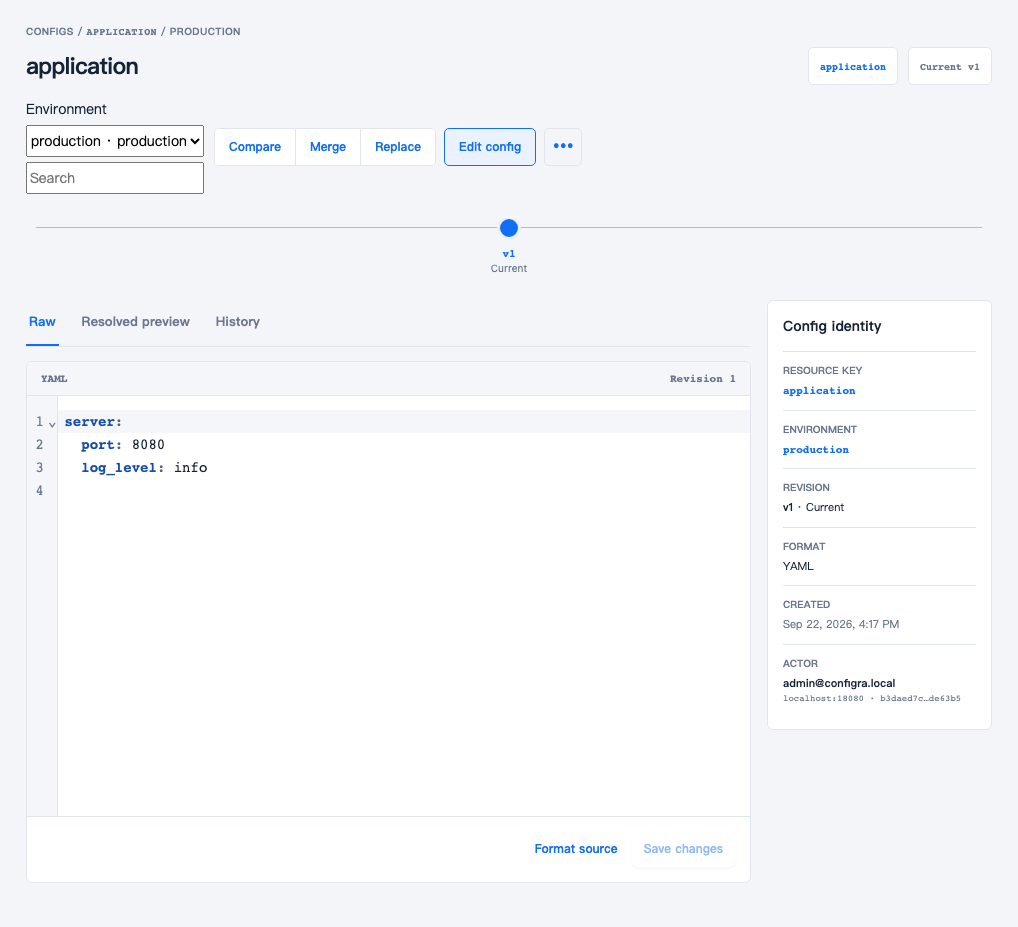
The file example reads application, shown above. The later environment-variable example uses a different Config, application_env. All screenshots use demonstration data; click to open the original.
File delivery keeps this nested structure; a flat mapping is not required. A JSON Config can also be delivered as a file. Change the object’s path and the application’s reading path to app.json in that case; a filename extension does not convert the content format.
Install Secrets Store CSI Driver to mount the provider’s returned content in Pods. Recorded cluster tests used Kubernetes 1.35.0 and Driver 1.6.1; they do not establish results for other combinations. Use the official installation instructions. For periodic updates, enable enableSecretRotation=true and set rotationPollInterval.
From Driver 1.6, this interval is a minimum cache duration between rotations. An update still waits for kubelet’s next republish request, so setting five seconds does not promise delivery within five seconds. See the driver’s rotation behavior.
Create kubernetes/deploy/example-provider/kustomization.yaml with the following content. Change newName to your pushed image repository and --configra-url to an API address reachable from the cluster and covered by the server certificate. Leave images.name unchanged: it identifies the original example image to replace.
apiVersion: kustomize.config.k8s.io/v1beta1
kind: Kustomization
resources:
  - ../provider
images:
  - name: registry.example.com/configra-kubernetes
    newName: registry.example.com/team/configra-kubernetes
    newTag: '1.0.1'
patches:
  - target:
      kind: DaemonSet
      name: configra-provider
    patch: |-
      - op: replace
        path: /spec/template/spec/containers/0/args/2
        value: --configra-url=https://configra-api.configra.svc
Create the server-trust Secret separately in the provider namespace, then deploy:
kubectl create namespace configra-provider --dry-run=client -o yaml | kubectl apply -f -
kubectl -n configra-provider create secret generic configra-server-trust \
  --from-file=ca.crt=/secure/server-ca.crt
kubectl kustomize kubernetes/deploy/example-provider
kubectl apply -k kubernetes/deploy/example-provider
kubectl -n configra-provider rollout status daemonset/configra-provider --timeout=120s
kubectl apply -f kubernetes/examples/provider.yaml
kubectl -n configra-app wait pod/configra-file-reader --for=condition=Ready --timeout=120s
kubectl -n configra-app exec configra-file-reader -- \
  sh -c 'test -s /etc/application/app.yaml && echo "app.yaml is ready"'
The last command should print app.yaml is ready. The repository example passes the credentials Secret to the CSI driver. The application container does not mount the Token or client private key; it reads /etc/application/app.yaml. BusyBox verifies file delivery here; it does not start a business service.
A SecretProviderClass specifies what to read and which files to create. This fragment mounts Config application from production as app.yaml. It is not a complete application deployment: the repository example also supplies the Pod, read-only mount and nodePublishSecretRef credential reference:
apiVersion: secrets-store.csi.x-k8s.io/v1
kind: SecretProviderClass
metadata:
  name: configra-application
  namespace: configra-app
spec:
  provider: configra
  parameters:
    fileMode: '0444'
    objects: |
      - type: config
        environment: production
        config: application
        path: app.yaml
Permissions default to 0440; 0400 and 0444 are allowed. The non-root example explicitly uses 0444, making mounted files readable by other UIDs in that Pod. Use narrower modes when the workload’s ownership/group setup supports them. Do not assume fsGroup repairs ownership on every rotation, or use subPath for files requiring refresh.
The provider is a trusted node extension. It runs as root to manage a hostPath Unix socket and has no ServiceAccount API Token. Review its node trust and deployment permissions separately.
To check an update, run the commands below and note the file checksum first. Then change application’s server.port to 8081 in Configra and save. After rotation, repeat the commands. The first shows mount status and versions; the second prints a file checksum without exposing its contents. The checksum should differ from the value before the edit. Your application still needs to reread the file to use the new port.
kubectl -n configra-app get secretproviderclasspodstatus
kubectl -n configra-app exec configra-file-reader -- cksum /etc/application/app.yaml
Native object sync
Install the CRD so Kubernetes recognizes ConfigraBinding rules, then run a controller in the application namespace. The example has two replicas, with an elected leader handling synchronization. Credentials and targets must stay in that namespace. Do not install it in the namespace holding Configra’s Master Key.
Two replicas do not ensure separate nodes. Check the NODE column with kubectl -n configra-app get pods -l app.kubernetes.io/name=configra-sync -o wide, then use your overlay’s placement rules to spread them. The example’s PodDisruptionBudget only limits evictions that honor it; it cannot prevent sudden node loss or direct Pod deletion. See Kubernetes disruptions.
Deploy the synchronization controller first
Native synchronization does not require the CSI Driver or provider. Create kubernetes/deploy/example-sync/kustomization.yaml, replacing the image repository and API address:
apiVersion: kustomize.config.k8s.io/v1beta1
kind: Kustomization
resources:
  - ../sync
images:
  - name: registry.example.com/configra-kubernetes
    newName: registry.example.com/team/configra-kubernetes
    newTag: '1.0.1'
patches:
  - target:
      kind: Deployment
      name: configra-sync
    patch: |-
      - op: replace
        path: /spec/template/spec/containers/0/args/2
        value: --configra-url=https://configra-api.configra.svc
kubectl apply -f kubernetes/deploy/crd.yaml
kubectl wait crd/configrabindings.configra.viber-ops.github.io --for=condition=Established --timeout=60s
kubectl kustomize kubernetes/deploy/example-sync
kubectl apply -k kubernetes/deploy/example-sync
kubectl -n configra-app rollout status deployment/configra-sync --timeout=120sA successful rollout means the controller has started. It does not prove that a Binding can read its data. For environment variables, continue to the next section; for files, use this example.
Mount nested YAML as a file
Save the earlier nested YAML as Config application in production. This is the full content of kubernetes/examples/binding.yaml in the release bundle:
apiVersion: configra.viber-ops.github.io/v1alpha1
kind: ConfigraBinding
metadata:
  name: application
  namespace: configra-app
spec:
  credentialsSecretRef:
    name: configra-credentials
  target:
    name: application-config
    kind: Secret
    mode: files
  refreshInterval: 1m
  objects:
    - type: config
      environment: production
      config: application
      path: app.yaml
The ConfigraBinding above reads once per minute and writes app.yaml into Secret application-config.
Wait for that Secret to be created:
kubectl apply -f kubernetes/examples/binding.yaml
kubectl -n configra-app wait configrabinding/application --for=condition=Ready --timeout=120s
kubectl -n configra-app describe secret application-config
describe secret should list one entry, app.yaml, and its byte count without displaying the content. Save this complete manifest as file-demo.yaml. The Pod mounts that entry at /etc/application/app.yaml:
apiVersion: apps/v1
kind: Deployment
metadata:
  name: file-demo
  namespace: configra-app
spec:
  replicas: 1
  selector:
    matchLabels: {app: file-demo}
  template:
    metadata:
      labels: {app: file-demo}
    spec:
      automountServiceAccountToken: false
      securityContext:
        runAsNonRoot: true
        runAsUser: 1000
        runAsGroup: 1000
        seccompProfile: {type: RuntimeDefault}
      containers:
        - name: application
          image: busybox:1.37.0
          command: [sh, -c, 'while true; do sleep 3600; done']
          securityContext:
            allowPrivilegeEscalation: false
            readOnlyRootFilesystem: true
            capabilities: {drop: [ALL]}
          resources:
            requests: {cpu: 5m, memory: 8Mi}
            limits: {memory: 32Mi}
          volumeMounts:
            - name: configuration
              mountPath: /etc/application
              readOnly: true
      volumes:
        - name: configuration
          secret:
            secretName: application-config
            defaultMode: 0444
kubectl apply -f file-demo.yaml
kubectl -n configra-app rollout status deployment/file-demo --timeout=120s
kubectl -n configra-app exec deployment/file-demo -- \
sh -c 'test -s /etc/application/app.yaml && echo "app.yaml is ready"'The example uses 0444 so the non-root demonstration container can read the file. Other UIDs with access to that mount can also read it; narrow permissions for your workload. The mount does not use subPath, so Secret updates can propagate to the file. Propagation takes time and the application must reread the file. This BusyBox example only checks that it exists.
Secret is the default. Secrets still need cluster access controls and suitable storage encryption; the name alone does not protect content. ConfigMaps are not confidential storage. Writing Vault-derived values to one requires explicit allowSensitiveConfigMap: true. Even a Config without Vault references may contain sensitive data, so operators must choose the target accordingly.
Environment variables: a complete example
The container should receive PORT=8080, LOG_LEVEL=info, and ENABLE_METRICS=true. There are three steps: a Configra Config → a controller-generated Secret → the Deployment’s envFrom. No application SDK is required.
Complete the credential and synchronization-controller setup above first. The Configra document and Kubernetes manifests below serve different purposes. Do not pass step 1’s Config document to kubectl apply.
1. Save a Config in Configra
Select production, create a YAML Config with key application_env, and save:
PORT: 8080
LOG_LEVEL: info
ENABLE_METRICS: true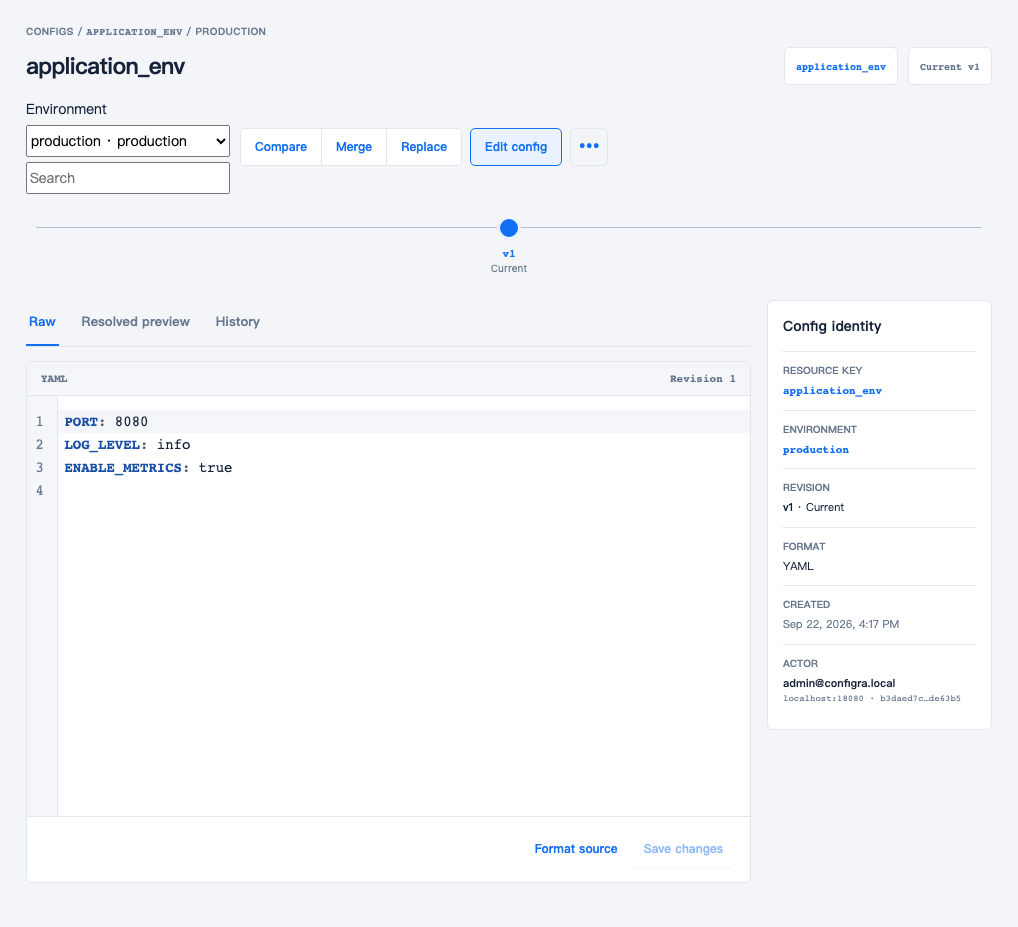
After saving, you should see these three fields. This is a real demonstration environment. Click any screenshot to open the original; commands and configuration remain available as copyable text.
This is a flat mapping: each top-level key names a variable, with a value directly beside it and no nested structure. Alternatively, choose JSON format and save the equivalent document. The Binding and Deployment remain unchanged:
{
  "PORT": 8080,
  "LOG_LEVEL": "info",
  "ENABLE_METRICS": true
}
The number 8080 and boolean true become strings in the container. Names retain their case; they must match [A-Za-z_][A-Za-z0-9_]*. Quote values whose exact text matters, including leading zeros: for example, ACCOUNT_CODE: '00123'.
2. Create the synchronization rule
Save this complete manifest as env-binding.yaml:
apiVersion: configra.viber-ops.github.io/v1alpha1
kind: ConfigraBinding
metadata:
  name: application-env
  namespace: configra-app
spec:
  credentialsSecretRef:
    name: configra-credentials
  target:
    name: application-env
    kind: Secret
    mode: env
  refreshInterval: 30s
  objects:
    - type: config
      environment: production
      config: application_env
      path: environment.yaml
The names have different purposes. config: application_env is the Configra Config key; target.name: application-env names the generated Kubernetes Secret; credentialsSecretRef identifies the existing credentials. path remains a required unique identifier for each source object, but env mode creates neither an environment.yaml file nor a variable with that name. The Secret keys are PORT, LOG_LEVEL, and ENABLE_METRICS.
kubectl apply -f env-binding.yaml
kubectl -n configra-app wait configrabinding/application-env --for=condition=Ready --timeout=120s
kubectl -n configra-app describe secret application-env
Expect three data entries. Let the controller create the target Secret. Manually creating it first causes TargetCollision. If the wait times out, consult the troubleshooting table instead of repeatedly deleting and recreating resources.
3. Consume the Secret with envFrom
Save this as env-demo.yaml. It is a runnable demonstration Deployment. For your own application, replace the image and startup command while keeping envFrom.secretRef:
apiVersion: apps/v1
kind: Deployment
metadata:
  name: env-demo
  namespace: configra-app
spec:
  replicas: 1
  selector:
    matchLabels: {app: env-demo}
  template:
    metadata:
      labels: {app: env-demo}
    spec:
      automountServiceAccountToken: false
      securityContext:
        runAsNonRoot: true
        runAsUser: 1000
        runAsGroup: 1000
        seccompProfile: {type: RuntimeDefault}
      containers:
        - name: application
          image: busybox:1.37.0
          command: [sh, -c, 'while true; do sleep 3600; done']
          envFrom:
            - secretRef:
                name: application-env
          securityContext:
            allowPrivilegeEscalation: false
            readOnlyRootFilesystem: true
            capabilities: {drop: [ALL]}
          resources:
            requests: {cpu: 5m, memory: 8Mi}
            limits: {memory: 32Mi}
kubectl apply -f env-demo.yaml
kubectl -n configra-app rollout status deployment/env-demo --timeout=120s
kubectl -n configra-app exec deployment/env-demo -- \
sh -c 'printf "%s\n" "PORT=$PORT" "LOG_LEVEL=$LOG_LEVEL" "ENABLE_METRICS=$ENABLE_METRICS"'Expected output:
PORT=8080
LOG_LEVEL=info
ENABLE_METRICS=true
This prints only three non-sensitive demonstration variables. Avoid bare env or printenv commands against real applications: they can expose every password to your terminal or an issue report. This Deployment does not run an HTTP server; PORT only demonstrates value delivery.
4. Confirm synchronization, then replace the application Pod
Change LOG_LEVEL to debug in Configra and save. Wait for the controller’s next synchronization and inspect only this non-sensitive field. A debug result confirms that the Secret has changed:
kubectl -n configra-app get secret application-env \
  -o go-template='{{index .data "LOG_LEVEL" | base64decode}}{{"\n"}}'
kubectl -n configra-app exec deployment/env-demo -- printenv LOG_LEVEL
The first command should now return debug; the second still returns info. Ready=True can remain from an earlier successful synchronization, so repeating kubectl wait does not prove that this edit has arrived. Once the Secret has the new value, replace the application Pod:
kubectl -n configra-app rollout restart deployment/env-demo
kubectl -n configra-app rollout status deployment/env-demo --timeout=120s
kubectl -n configra-app exec deployment/env-demo -- printenv LOG_LEVEL
It should now return debug. Configra does not restart Deployments for you. Restarting the synchronization controller does not reload your application either. An explicit variable in your Deployment’s env overrides the same name from envFrom; check for duplicates when integrating. See Kubernetes environment variables.
5. Add Vault references and a development environment
After the basic example works, create Vault namespace platform, item database, Text field host, and Secret field password. Create two sets of values (Variants), bound to production and development respectively:
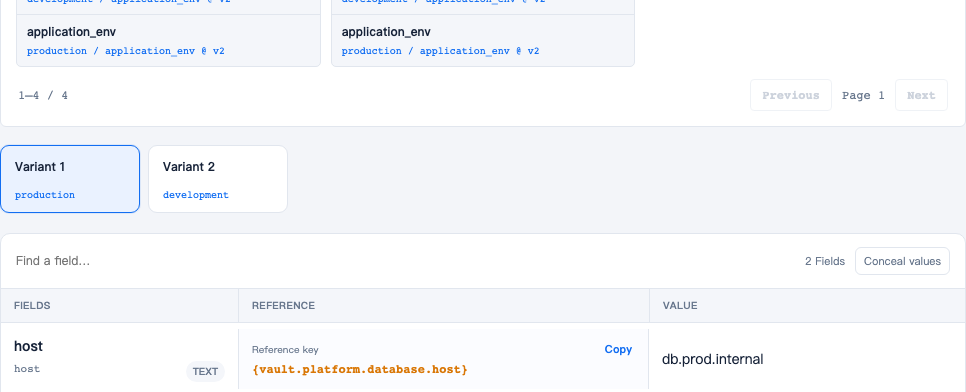
Production is selected above, with host db.prod.internal. Select development to enter db.dev.internal and the development password. Keep the field keys host and password; do not create separate fields for each environment.
Save the following application_env document in both Environments, keeping the reference text identical:
PORT: 8080
LOG_LEVEL: info
ENABLE_METRICS: true
DB_HOST: '{vault.platform.database.host}'
DB_PASSWORD: '{vault.platform.database.password}'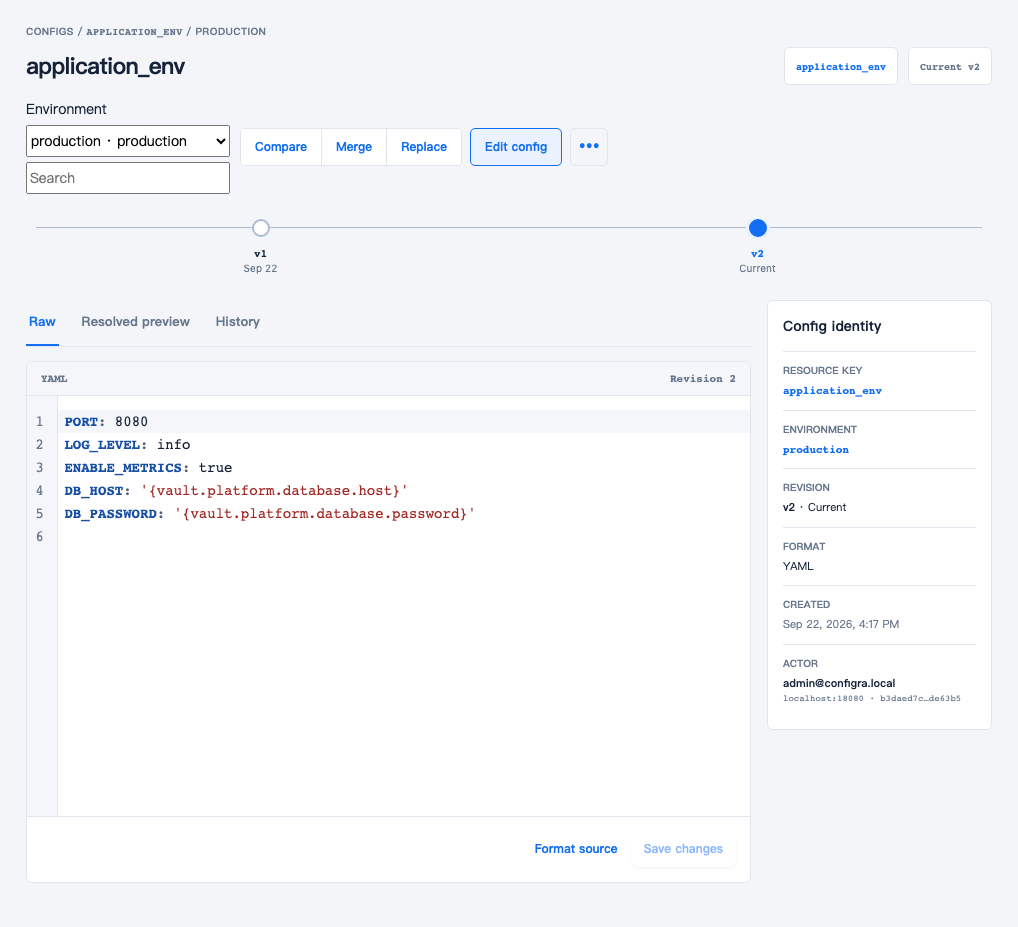
The raw configuration contains references, not passwords. Production is still selected above. Save the same text for development; the environment chosen when reading determines the actual values.
| Configra Environment | Example Vault host value |
Container variable names |
|---|---|---|
| production | db.prod.internal | DB_HOST, DB_PASSWORD |
| development | db.dev.internal | DB_HOST, DB_PASSWORD |
Prepare a separate Token, certificate, and credentials Secret for the development workload. When copying the Binding into that workload’s namespace, select environment: development, its credentialsSecretRef, and namespace. Keep Config key application_env; the application still reads DB_HOST and DB_PASSWORD. Do not repoint a running production Binding at development just to try the example.
Synchronization delivers values already resolved by Configra, not brace-delimited references. After the Secret updates and you replace the demonstration Pod, check that a password exists without printing it:
kubectl -n configra-app exec deployment/env-demo -- \
  sh -c 'test -n "$DB_PASSWORD" && echo "DB_PASSWORD is set"'
Vault File fields cannot be env objects; mount them as files. Env YAML/JSON values cannot be arrays, objects, or null. Write an intentional empty string explicitly, for example OPTIONAL_VALUE: ''.
Configurations that do not work in env mode
This Config cannot be used in env mode. The controller does not automatically turn it into DATABASE_HOST:
database:
  host: db.prod.internal
For environment variables, use DATABASE_HOST: db.prod.internal. If the application already reads nested YAML, retain that structure and use files mode instead. Duplicate keys, invalid variable names such as database.host, and the same variable supplied by multiple objects are also rejected. Later objects do not override earlier ones.
If an existing application uses envFrom.configMapRef and its data is non-sensitive, change the Binding’s target.kind to ConfigMap and the Deployment’s corresponding secretRef to configMapRef. Change both sides. Keep Secret for Vault references; do not enable allowSensitiveConfigMap simply to suppress an error. To migrate an existing ConfigMap, choose a new target name, verify it, then change the application’s reference. The controller will not take over your old object.
To remove this demonstration, delete only resources created by these two files. Deleting the Binding also removes its generated Secret; do not do this while applications still depend on it. Shared credential/trust Secrets and namespaces are not removed by this command.
kubectl delete -f env-demo.yaml -f env-binding.yamlTroubleshoot synchronization
kubectl -n configra-app get configrabindings
kubectl -n configra-app get configrabinding application-env -o yaml
kubectl -n configra-app get pods
status.conditions reports the reason. status.lastSyncedAt is the last successful synchronization time; an old target and timestamp can remain after failure. Status contains no configuration content or private upstream error text.
| Reason / symptom | What to check |
|---|---|
CredentialsUnavailable |
Check credentialsSecretRef.name; credentials must be in the Binding’s namespace and readable by the controller |
FetchFailed |
Check API connectivity and server CA, Token Environment grants, client certificate expiry/revocation, Config key, its revision in this Environment, and Vault references; do not disable TLS verification |
InvalidEnvironmentMap |
Preview the resolved document in Configra; check for nested objects, arrays, nulls, invalid names, or duplicate keys, then save a corrected version |
DuplicateEnvironmentName |
Multiple source Configs define one variable; remove the duplicate or rename it rather than changing object order |
SensitiveConfigMapDenied |
Use a Secret for Vault-derived values and update the application’s reference type |
TargetCollision |
Another object already uses the target name; choose a new name rather than deleting or taking over an active application Secret / ConfigMap |
TargetTooLarge |
The native target exceeds 900 KiB; reduce the content or evaluate file reads, rather than assuming a Secret has no size limit |
CreateContainerConfigError |
First make the Binding Ready, then check the Pod’s Secret/ConfigMap name and namespace |
ImagePullBackOff |
Replace the example registry, push the image, and configure any required private-registry credentials |
| Secret changed but variables did not | Confirm the target, roll out the application Deployment, and check for an explicit env overriding the same name |
Failure and lifecycle
The controller only updates targets it owns through a controller owner reference. Read failures retain previous data. A target-name/kind change removes the old owned target only after the new write succeeds. Deleting a Binding lets garbage collection remove its owned target.
A failed CSI read does not return a partial file set. Existing mounted/native data can remain available after credential revocation; revocation cannot recall previously delivered bytes.
CSI Driver and Configra provider must run on every node consuming configuration. Moving an application to another node requires a fresh mount and Configra read; a new CSI Pod can remain waiting for its volume when the API is unavailable. The repository’s standalone Pod is an integration example, not an application rescheduling controller. Use a Deployment or another suitable workload controller for the real application.
Recovery from node loss is not immediate. Kubernetes must detect the failure and update Service endpoints; a surviving sync replica must acquire leadership. Default unreachable-node tolerations can also leave Pods bound to a failed node for about five minutes after detection. This is separate from Configra’s refresh interval. See Kubernetes node-loss eviction behavior.
Limits: at most 32 CSI objects and 3 MiB combined; 900 KiB per native target; 128 KiB per env-mode source document.
Native volumes have propagation delays, and an existing process does not acquire changed envFrom variables. See Kubernetes ConfigMap behavior and CSI rotation.